'HMRC' tax refund scams 2026: how to spot a fake refund email or text

As it's once again time to file Self Assessment tax returns, scammers will be targeting the public with more fake 'HMRC' tax refund scam emails and texts than usual. Here's how to spot a fake tax rebate offer.
Sections
4 common HMRC tax refund scams: what they look like
Many self-employed Brits will be busy putting the finishing touches on their tax returns.
And as sure as night follows day, this will trigger a surge in scammers trying to trick those who file Self Assessment tax returns each year into handing over their information – or worse, their cash.
How tax scammers will target you
While it's not uncommon for scammers to try their luck on the phone – you can listen to a recording of a typical conman's gambit here – you're far more likely to be informed of your fake tax refund by text or email.
These tax scams are becoming increasingly slick and sophisticated – some even reference your Government Gateway Account – but there are a few obvious warning signs to help you spot it's fake.
The classics include pressure to act quickly, asking for personal details and dubious links.
Let's take a look at some examples of fake tax refund emails and highlight the telltale signs they're scams.
4 tax scams: how to spot them
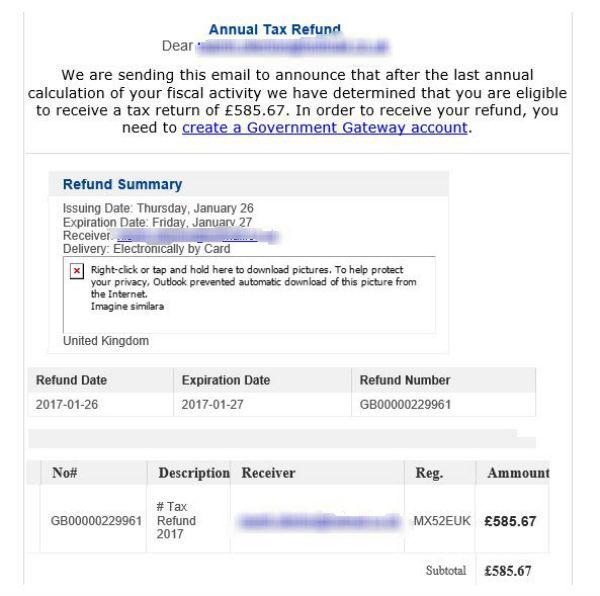
'Annual Tax Refund' scam
'New Tax Calculation' scams


Classic 'Tax Refund' scam

These 'HMRC' scam emails often contain the taxman's logo and official-style reference numbers. However, the dodgy English should set alarm bells ringing, as should the rapid call to action.
Often, the email addresses appear genuine too, ending in 'hmrc.gov.uk', much like the one we've screengrabbed below:

However, the second (real) address gives the game away.
Here are some of the reported email addresses used to distribute the tax rebate emails, according to HMRC:
- reve.alert@hmrc.gov.uk
- services@hmrc.co.uk
- noreply@hmrevenue.com
- service@hmrc.gov.uk
- service.refund@hmrc.gov
- secure@hmrc.co.uk
- hmrc@gov.uk
- taxes@hmrc.co.uk
- taxrefund-notice@hmrc.gov.uk
- taxrefund@hmrc.gov.uk
- refund-help@hmrc.gov.uk
- service@online.com
- email@hmrc.gov.uk
- refund.alert@hmrc.gov.uk
- refunds@hmrc.gov.uk
- srvcs@hmrc.gov.uk
- alertsonline@hmrc.co.uk
- info@hmrc.gov.uk
- rebate@hmrc.gov.uk
The fake phishing website you click through to can also look genuine, as this example demonstrates.
How you can tell the 'HMRC' tax email is a fake
Simple: HMRC never contacts customers who are due a refund by email or text. It only ever sends such a letter by post.
HMRC will never send a text message offering a tax refund in exchange for personal/banking info. Report scams here: http://t.co/eP9tEXHxUm
— HM Revenue & Customs (@HMRCgovuk) 28 January 2015
Similarly, it's worth knowing that HMRC never contacts taxpayers about refunds by telephone, and never uses external companies regarding refunds.
Basically, if it doesn't come in the post from HMRC, it's fake. End of story.
With this in mind, it's worth making sure the taxman has your correct postal address.
What to do if you receive an email
If you do get an email like this, you should send it to HMRC for investigation before deleting it. Forward all suspicious emails to HMRC at phishing@hmrc.gsi.gov.uk.
And if you have reason to believe you have been the victim of an email scam, report the issue to your bank/card issuer as soon as possible.
Fake tax refunds: how to beat the scammers
Remember, phishing emails are common for all sorts of issues.
As a rule of thumb, never click on links contained in suspicious emails or open attachments.
You can get more help via the Get Safe Online website.
If you use mobile banking, you may also want to read our guide to the common security mistakes to avoid.
To help you stay one step ahead of online fraudsters, have a look at our guide to common email scams and how to spot them.
Comments
Be the first to comment
Do you want to comment on this article? You need to be signed in for this feature